
Have you noticed your Instagram grid looking different lately? A taller, more vertical layout has replaced the familiar square format that defined Instagram's visual identity for years.
Your carefully curated feed might suddenly feel off-balance. Those perfectly planned photo sequences, meticulously edited square images, and thoughtfully arranged content that once flowed seamlessly across your profile now appear stretched and misaligned in the new format.
The change affects everything from your brand aesthetics to your content strategy.
That's why we have this guide to walk you through Instagram's new 3:4 grid format and explain how to adapt your social media marketing strategy, master the technical specifications, and create visually stunning posts that shine in the updated layout.
Key Takeaways
- Instagram has switched from a square 1:1 grid to a taller 3:4 format, changing how photos appear in profiles.
- The new grid preview dimensions are 1015 x 1350 pixels, and the maximum upload ratio for posts is 4:5.
- Stories and Reels keep their 9:16 ratio (1080 x 1920 pixels), but their grid previews adjust to match the new format.
- You can now adjust how your photos appear in the grid view using Instagram's built-in tools after posting.
- The taller format requires rethinking content strategy, from shooting techniques to text placement and visual flow across posts.
- Professional editing tools like Canva and Adobe Express help create polished content that stands out in the new format.
The New Instagram Grid Format
Instagram has rolled out a significant update to its platform design, moving away from its iconic square grid. This change reflects the platform's evolution towards more vertical-friendly content consumption patterns, particularly with the rise of Reels and Stories.
The most notable change in 2025 is the shift from the traditional 1:1 square format (1080 x 1080 pixels) to a taller 3:4 grid preview (1015 x 1350 pixels) for profile layouts. This update aligns with current user behaviour, as Instagram's head, Adam Mosseri, noted that most photos and videos uploaded to the platform are now vertical.
The transition to a 3:4 grid preview marks a strategic move by Instagram to better showcase vertical content. However, it's crucial to understand that while the grid preview displays content in a 3:4 ratio, Instagram still maintains a maximum upload ratio of 4:5 for feed posts and carousels.
So, if you're using Instagram for social media marketing, continue reading to know what to do.
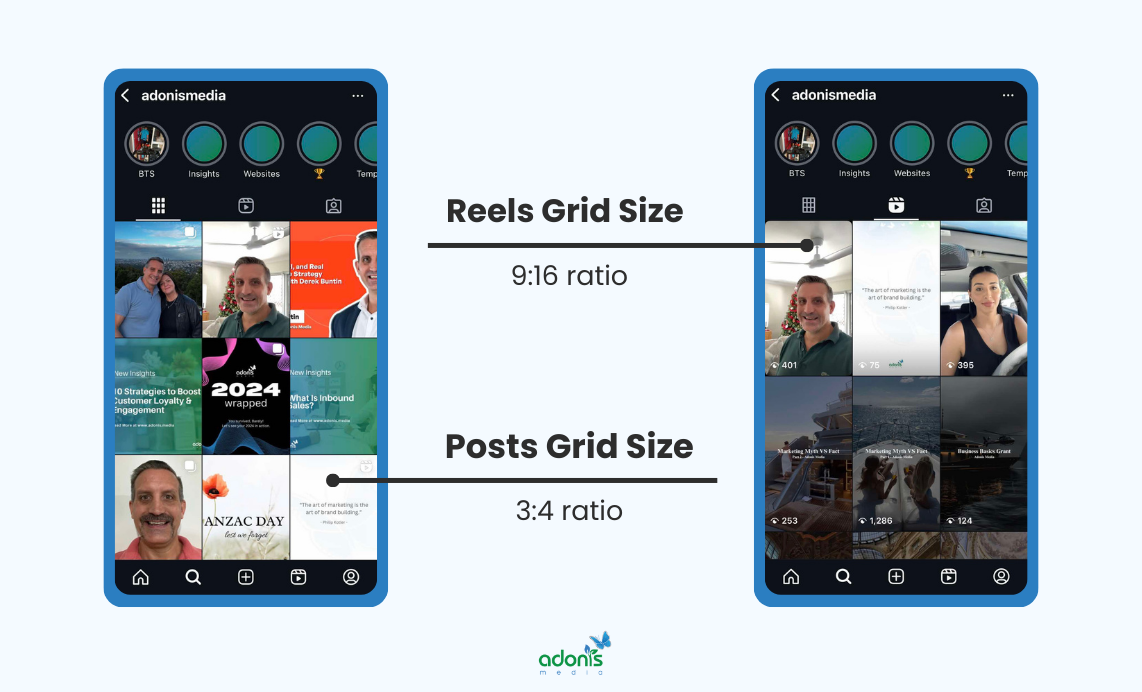
Posts Grid Size Is 3:4 Ratio
The shift from the traditional 1:1 square format to a 3:4 ratio has changed how photos appear in your Instagram profile grid.
Previously, all posts were displayed as perfect squares at 1080 x 1080 pixels, but now they're shown as rectangles at 1015 x 1350 pixels in the grid view.
When you upload photos to Instagram now, the platform automatically adjusts them to fit the new 3:4 preview ratio whilst maintaining the original image quality.
Reels Grid Size Is 9:16 Ratio
Instagram Reels maintain a consistent 9:16 ratio, displaying at 1080 x 1920 pixels in full and grid view.
In the post grid, these vertical videos are automatically adjusted to the new 3:4 preview format to make a uniform look across your profile whilst preserving the vertical viewing experience when opened.
The platform also optimises Reels previews to show the most engaging part of your video in the grid view.
Impact on Content Strategy
The new Instagram grid format requires a fresh approach to content creation and visual storytelling. This shift demands careful consideration of how your photos and videos will appear in the taller preview format, affecting everything from shooting angles to brand consistency.
Visual Branding Adjustments
Your brand colours, logos, and key visual elements need strategic placement within the new vertical format to ensure they remain visible and impactful in both the grid preview and full-post view.
Creating a cohesive feed now requires more attention to the vertical flow of content, with special consideration for how images connect visually from top to bottom. This includes adjusting your photography style, graphic design templates, and visual hierarchy to make the most of the additional vertical space.
Content Planning Considerations
Planning your content calendar now requires a dual focus on how posts appear individually and how they work together in the new vertical grid format.
Your content mix needs careful curation to maintain visual harmony in the grid view. This includes balancing different types of content like photos, carousel posts, and Reels, while ensuring each piece can stand alone and contribute to your overall grid aesthetic.
Engagement Optimisation
The taller grid format offers new opportunities to capture attention as users scroll through profiles. By strategically placing key visual elements within the most visible areas of the 3:4 preview, you can increase the likelihood of profile visitors tapping through to see the full post.
To maximise engagement, focus on creating scroll-stopping moments within the initial preview area of each post. This means placing your most compelling visual elements where they'll be immediately visible in the grid whilst saving supporting details for the full post view.
Key Instagram Post Sizes
Understanding the correct dimensions for different Instagram content types helps ensure your posts display perfectly across all parts of the platform.
Profile Picture
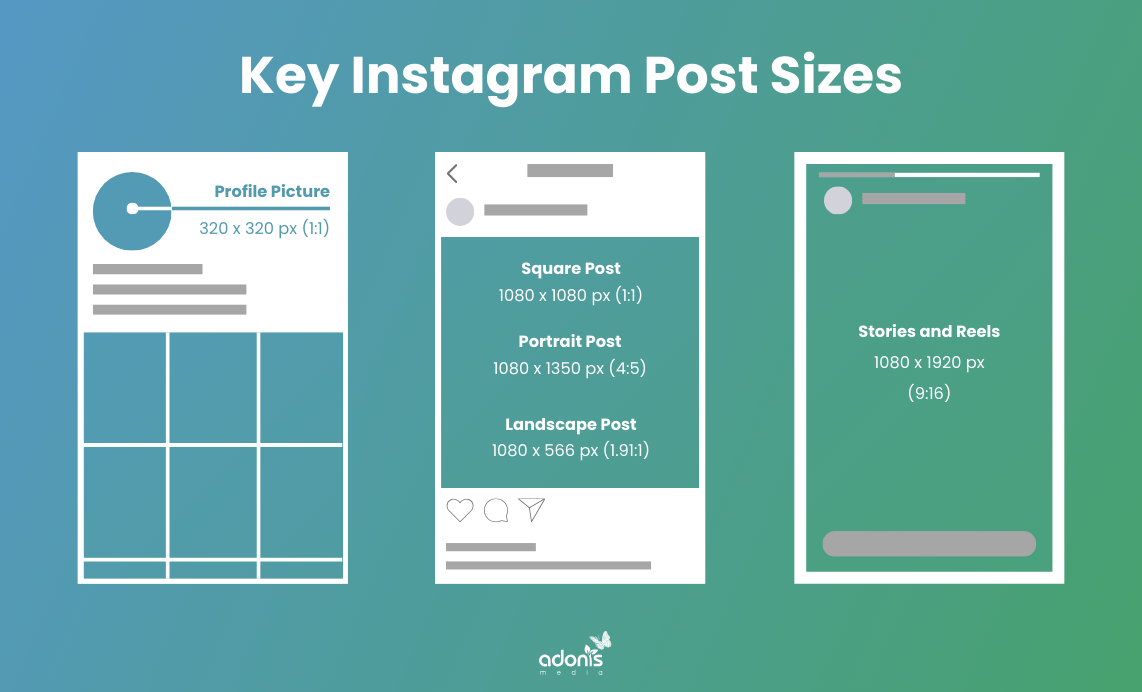
Instagram profile pictures maintain a 1:1 ratio with dimensions of 320 x 320 pixels, displaying as a perfect circle on your profile. This size ensures your profile image remains clear and professional across all devices and viewing formats.
For the best results, upload a slightly larger image that can be cropped to fit, ensuring the main subject is centred within the circular frame.
Image Posts and Carousels
Square posts use 1080 x 1080 pixels (1:1 ratio), while portrait posts can extend to 1080 x 1350 pixels (4:5 ratio). For landscape orientation, the recommended size is 1080 x 566 pixels (1.91:1 ratio), though this appears smaller in the new grid format.
When creating carousel posts, maintain consistent dimensions across all slides to ensure a smooth viewing experience. The new 3:4 grid preview will still show the first image of your carousel.
Stories and Reels
Stories and Reels use a full-screen vertical format with dimensions of 1080 x 1920 pixels (9:16 ratio). This tall format maximises screen real estate on mobile devices and provides an immersive viewing experience.
When creating content for these formats, keep important elements away from the edges and account for any text or stickers you'll add, as these can affect how your content displays in both full view and grid preview.
How to Adapt the New Instagram 3:4 Grid
The transition to Instagram's new grid format requires understanding how your images will appear in different views and knowing the right techniques to maintain visual appeal.
Old Grid vs New Grid Size
While both grid formats share the same maximum width of 1080 pixels, the key difference lies in their vertical display.
The new 3:4 grid offers 270 additional pixels of vertical space compared to the old 1:1 format. However, 65 pixels of horizontal space are removed. That's minimal, so don't worry about its significant effect.
How Instagram Crops Images
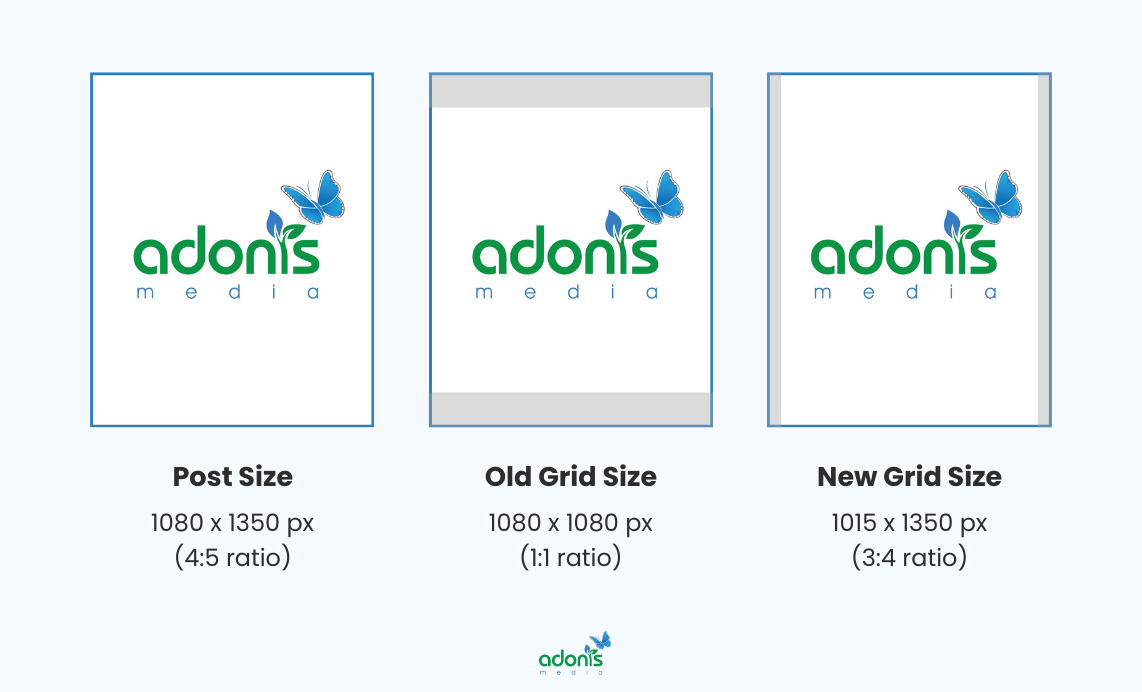
When you upload a 4:5 photo (1080 x 1350 pixels) to Instagram, the old grid system would crop it into a square preview (1080 x 1080 pixels), showing only the central portion of your image while hiding the top and bottom sections until viewers tap on the post.
With the new 3:4 grid preview (1015 x 1350 pixels), your vertical photos retain more of their original composition in the grid view.
How to Adjust Images to Adapt the Grid
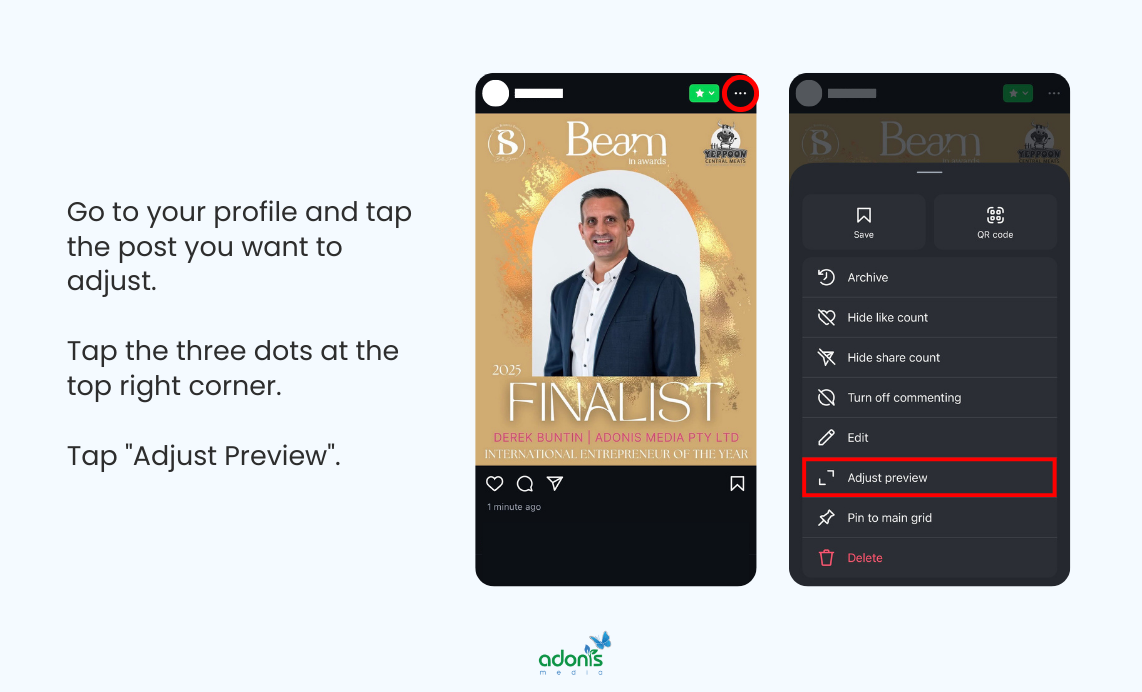
Instagram offers built-in tools to adjust how your photos appear in the grid view, even after posting. This feature helps you maintain visual consistency across your profile while adapting to the new format without needing to delete and repost content.
To adjust the grid preview of your post, go to your profile and click any post you want to adjust.
Tap the three dots at the top right corner, then "Adjust Preview."
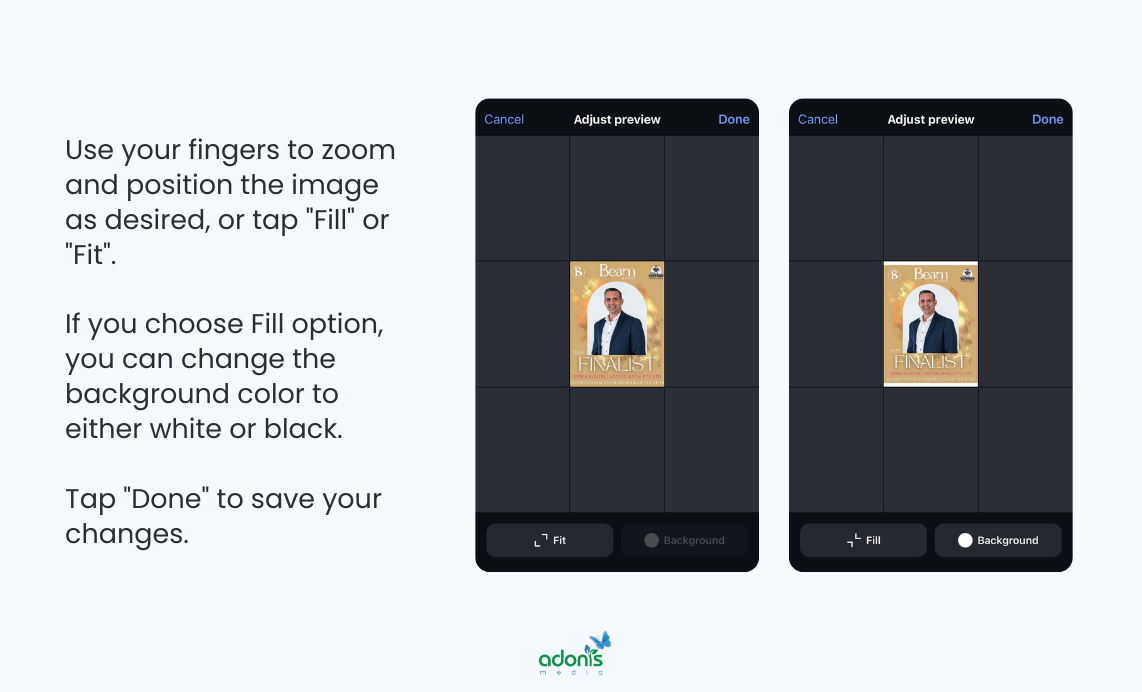
Use your fingers to zoom and position the image as desired, or tap "Fill" or "Fit"
If you choose Fill option, you can change the background colour to either white or black
Tap "Done" to save your changes.
Review your profile grid to ensure the adjustment fits with the surrounding posts.
Instagram Content Creation Tips with the New Grid
Creating content for Instagram's new grid format requires a fresh perspective on visual storytelling. The taller preview opens up new possibilities for creative expression while demanding more thoughtful planning of your content strategy.
Plan Your Visual Flow
The new 3:4 grid format creates a more pronounced vertical flow, making it essential to think about how your posts connect visually from top to bottom. Consider how colours, themes, and subjects transition between posts to create a smooth, eye-catching journey down your profile.
Think of your grid as a magazine layout, where each row tells a story, and the overall feed creates a compelling visual narrative that encourages followers to keep scrolling through your content.
Shooting and Composition Techniques
When capturing photos or videos, leave extra headroom and footer space to accommodate the taller grid preview. Position your main subject slightly above the centre, as the new format tends to draw viewers' eyes upward through your content.
Try shooting from a lower angle to create more dynamic vertical compositions, and use leading lines that draw attention upward or downward to make the most of the additional vertical space.
Text Placement and Overlay Design
With the taller grid preview, text overlays and graphics need careful positioning to remain visible and legible in both grid and full-post views. Keep essential text elements within the middle 60% of your vertical space to ensure they appear in the grid preview.
For instance, if you're creating a quote post or promotional content, place your main message in the centre, with supporting elements like your logo or call-to-action buttons in the lower third of the image.
Mixing Content Types Effectively
The new grid format affects how different content types appear in your profile, so it's crucial to balance your mix of photos, carousels, and Reels. Create a content rhythm that alternates between these formats to keep your grid visually interesting and engaging.
For example, you might follow a pattern of a single photo, carousel, or Reel, then repeat, ensuring each type of content complements the others while maintaining visual harmony in the taller grid preview.
Use Other Editing Tools Beside Instagram Built-In Features
While Instagram's built-in editing tools are handy for quick adjustments, professional editing software can help you create more polished content that stands out in the new 3:4 grid format.
Top editing tools for creating Instagram-ready content:
- Canva: A user-friendly design platform perfect for creating templates, adding graphics, and resizing images
- Adobe Express: Offers professional-grade tools for quick edits, including AI-powered features to help adjust images
- Adobe Photoshop: The industry standard for professional photo editing, providing complete control over image composition, colour correction, and precise sizing for the new grid format
Further Learning
Looking to learn more? I've collected some fantastic resources that go hand-in-hand with this topic if you want to dive deeper.
- youtube.com — Natalia Kalinska Channel Video: "New Instagram Grid Update 2025 | Do THIS to FIX it in Canva (Tutorial)"
- youtube.com — Jacqui Naunton // White Deer Channel Video: "NEW INSTAGRAM GRID 2025 | Fix past designs + design new posts perfectly"
- reddit.com — Reddit r/photography Thread: "New Instagram Grid 2025. Will it be reverted?"
- reddit.com — Reddit r/Instagram Thread: "Grid Layout - Rectangles"
- reddit.com — Reddit r/Canva Thread: "Instagram/Canva Grid Help"
Mastering Your Instagram Posts Moving Forward
Instagram's shift to a 3:4 grid format marks a significant change in how we present and consume visual content on the platform. While this update might seem challenging at first, it opens up exciting possibilities for creative expression and better content showcase.
By understanding the new dimensions, adjusting your shooting techniques, and implementing thoughtful content strategies, you can turn this change into an opportunity to refresh your Instagram presence and engage your audience in new ways.
Need help adapting your social media marketing strategy for Instagram's new grid format? Book a free consultation today, and let's discuss how we can enhance your Instagram presence with tailored solutions for your brand.
Got a question in mind? Check out the FAQs below for quick answers!
